AI TOOL / #04050
AI Roundtable
Ask a question and receive answers from multiple AI assistants.
Introduction
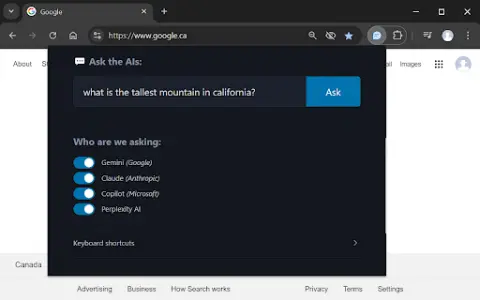
Ask one question, get answers from multiple AI assistants.
What is a Multiple AI Assistants Chrome extension/plug-in?
This website allows users to submit questions at once and receive answers from multiple AI assistants. Users can customize which assistant they want to use for their queries. The website also provides keyboard shortcuts, making it easy to access various functions quickly.
How to use the Multiple AI Assistants Chrome extension?
Use the shortcut keys Ctrl/Cmd + Shift + Q to open the query window and start typing your question. Use Alt + 1 to switch to Gemini, Alt + 2 to switch to Claude, Alt + 3 to switch to Copilot, and Alt + 4 to switch to ChatGPT.
The core functions of various AI Assistant extensions/plugins for Chrome.
Query multiple AI assistants simultaneously
It is possible to customize the selection of AI assistants.
Convenient and fast keyboard shortcuts
Related
Kuakua – Psychology & AI Tools for Well-Being
AI-powered psychology tools for mental health and well-being.
AI Meditation by Clairity Healing
Personalized AI-guided meditation based on users' experiences, designed to help achieve balance and focus.
Deepwander
AI-powered introspection tools that foster self-awareness and personal growth.
Soula Care
An AI assistant designed to support women's health, providing assistance throughout the entire process – from pregnancy to postpartum and beyond.
Bliss Brain
An AI-based meditation app that generates personalized guided meditation sessions.
Therapy Talk
An artificial intelligence-powered platform for providing mental health support, which is reviewed by certified therapists.