AI TOOL / #04197
Text Selected
An extension for selecting text and retrieving relevant answers from a remote JSON file.
Introduction
Extension for selecting text and getting relevant answers from a remote JSON file.
What is the Text Selection Extension AI Chrome extension/plugin?
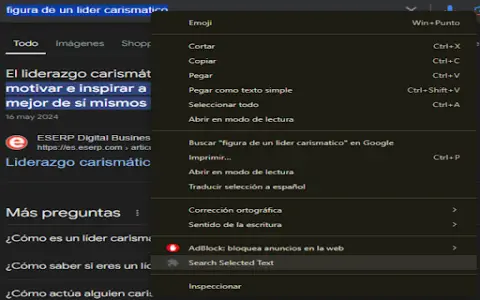
This extension allows users to select text on a webpage and quickly and efficiently get relevant answers. When you select text and use the extension’s context menu option, the selected text is sent to a remote service, which searches for the corresponding answer in a JSON file hosted on Google Cloud Storage. The answer is then displayed as an alert, providing you with additional information about the selected text. This is a useful tool for getting data and answers while browsing the web.
How do I use the Text Selection Extension AI Chrome extension/plugin?
Select text on a webpage and use the extension’s context menu option; the answer will be displayed in an alert.
Core features of the Text Selection Extension AI Chrome extension/plugin
Text selection and answer retrieval
Context menu integration
Remote JSON data source
Alert-based answer display
Related
aigirlfriends.ai
AI Girlfriend Chat Simulator – offers virtual, romantic conversations as well as the ability to create a customized AI partner.
Face Shape AI
Upload a photo to determine your face shape with AI.
Verificient
Online identity verification and remote proctoring solutions to ensure exam integrity.
Flypix
A geospatial AI platform for Earth observation data that provides object detection and analysis.
Pixlyze
Pixlyze detects AI-generated images with high accuracy and speed, ensuring their authenticity.
Jetcounter
An AI-based mobile app for real-time item counting that is highly accurate and customizable.