AI TOOL / #06136
Ask Screenshot for Gemini
Improve productivity by integrating screenshot and text analysis with Gemini.
Introduction
Enhances productivity by integrating screenshot and text analysis with Gemini.
What is the Ask Screenshot AI Chrome extension/plug-in?
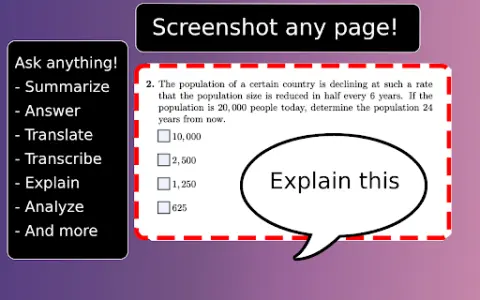
Ask Screenshot is a tool designed to enhance productivity by directly integrating screenshot and text selection analysis with Gemini. It enables users to quickly capture screenshots or select text, and then use Gemini to perform tasks such as summarizing, transcribing, interpreting, translating, or carrying out other operations based on predefined or customizable templates.
How to use the Ask Screenshot AI Chrome extension/plug-in?
To use “Ask Screenshot”, simply right-click on any page and hover over “Ask Gemini” to access the available screenshot templates. For selecting text, right-click on the desired text and hover over “Ask Gemini” to view the available templates.
Explore the core features of the Screenshot AI Chrome extension/plug-in.
Take a screenshot and perform analysis: After capturing the screenshot, Gemini will automatically be used to conduct the analysis.
Select and analyze text: Right-click on any selected text to automatically have Gemini perform the analysis.
Related
SlowMo AI
An AI learning platform designed for children, with a focus on safety and interactive games.
Chess Game Play Chess Against Computer
Playing chess with a computer AI, the difficulty level is adjustable, and it is completely free.
GeoGuess
A free online geography game in which players compete by attempting to guess the locations of the depicted places.
Verseify
An AI-powered platform for UEFN development, offering features such as Verse code generation.
GameGen-O
An AI game generator designed for creating open-world video games.
ATR Tennis
ATR Tennis provides tennis fans with real-time data, match insights and artificial intelligence analysis.