AI TOOL / #06173
Briefly: AI meeting summary & email follow up
Automatically generate meeting minutes, perform transcription, provide summaries, and carry out follow-up actions in a concise manner to enhance work efficiency.
Introduction
Briefly automates meeting notes, transcriptions, summaries, and follow-ups to enhance productivity.
What is the Briefly AI Chrome extension/plugin?
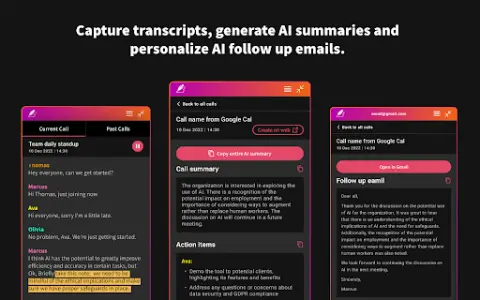
Briefly is a browser extension designed to capture meeting notes, transcribe conversations, summarize key points, and gather valuable insights without causing any disruptions. By automatically taking notes and providing tools to organize thoughts, it helps users stay focused during meetings. Briefly also simplifies the follow-up tasks after meetings by generating summaries, action items, and necessary emails. Moreover, it converts conversation contents into useful documents such as product requirements, market reports, or investment memorandums. It integrates with platforms like Slack, allowing users to update their CRM systems with meeting summaries and key insights.
How to use the Briefly AI Chrome extension/plug-in?
To use Briefly, please install the Chrome extension, log in using your Google account, start a Google Meet session, and then click “Start transcribing this meeting” within that call. After the call is over, open the Briefly extension to view the transcription and the AI-generated summary. Use the “Follow-up” tab to edit the content and send follow-up emails from your Gmail inbox. You can also access additional features by clicking the “Create on web” button or using the provided URL.
In brief, the core functions of the AI Chrome extension/plugin.
Meeting transcription and classification
Summaries and key insights generated by AI
Personalized action plans
Automated generation of subsequent emails
Generate project documentation from the transcription results.
Integration with platforms such as Slack
Related
Glasshand
Renting real iPhones and Macs for AI agents
DocsAlot
A managed document platform that can be read by both humans and AI systems
crystl
Terminal for managing multiple AI programming agents on macOS
Flova AI
Animation and Film/TV Applications for AI Video Agents
Nico
Voice AI assistant on Mac
WebGameHub
A website featuring 54 free HTML5 mini-games based on classic games – simply open the page and start playing. These games cover seven major categories, including puzzle, action, arcade, and card/racing games. There are no pop-up ads, and no registration is required for downloading them.