AI TOOL / #08846
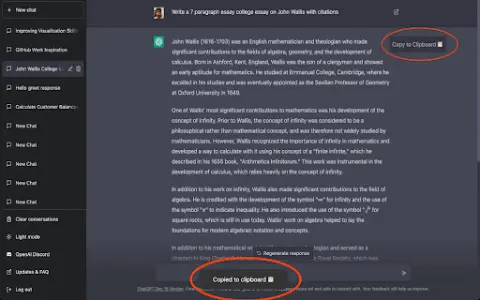
Copy for Chat GPT
An extension used to copy ChatGPT responses and check for plagiarism.
Introduction
Extension to copy ChatGPT responses and check for plagiarism.
What is the Plagiarism Detector Extension for Chrome – an extension/plug-in for Google Chrome?
This extension allows you to copy the responses generated by ChatGPT by clicking a button or using the CMD+K shortcut key, and then have those responses checked by plagiarism detection tools.
How to use the Plagiarism Detector Extension for Chrome?
You can use this extension by clicking the copy button on ChatGPT’s response or by pressing CMD+K. The copied text will be automatically checked to determine whether it contains any plagiarized content.
The core functionality of the Plagiarism Detector Extension for Chrome.
One-click to copy the response from ChatGPT
Use the CMD+K shortcut key to copy.
Automatic plagiarism detection
Related
Dictanote
A note-taking app with speech-to-text functionality that supports more than 50 languages and AI summarization.
ChatGPT Enhanced
ChatGPT has improved its text-to-speech functionality by utilizing OpenAI’s Whisper-1 technology.
Patee.io – Thai Transcription Service
An efficient AI-driven platform for voice-to-text conversion.
Transcribe Video & Audio to Text Free Online
An artificial intelligence-based service that converts audio and video content into text.
WhisperUI – Text to Speech
WhisperUI: Affordable text-to-speech and speech-to-text services that utilize the OpenAI Whisper API.
Callbook.ai – Zoho CRM
An artificial intelligence phone system integrated with Zoho CRM to achieve efficient call management and data storage.